1 - 2 - 3 - Login to your existing account as usual
entering your TrainingPeaks Username & Password

After you login to your existing account
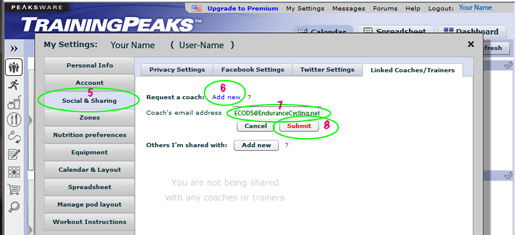
4 - click on My Setting

5 - Click on Social & Sharing
6 - Click on Request a coach: Add New
7 - Enter our EC address -
dot com
8 - Click Submit
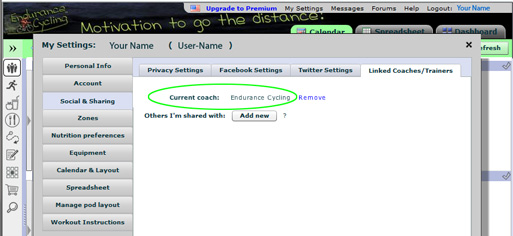
Once your connection to EC-ODS has been approved the header on your TrainingPeaks account will be changed with Endurance Cycling being listed as your Current coach within the Social & Sharing section of 'My Settings'.
You may remove this connection at any time, but you will be removed from any Challenge/Competition within the EC programs. You must be linked to EC-ODS to be eligible for any EC awards.